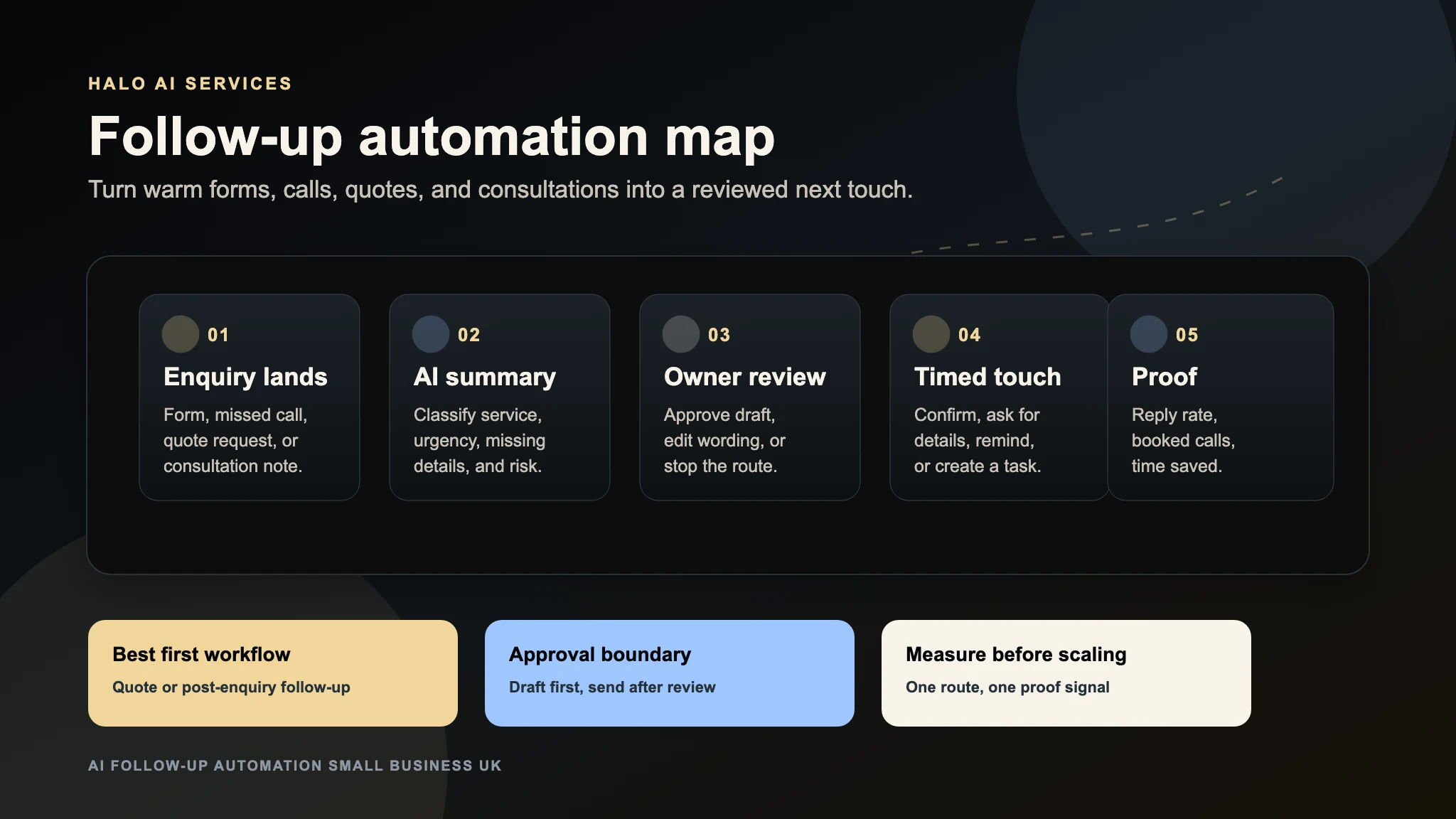
AI quote follow-up automation helps a small business keep track of estimates after they have been sent. The useful version does not pressure buyers or replace judgement. It confirms what was quoted, spots missing decisions, reminds the owner when a lead is warm, and sends only the follow-ups the business has approved.
For a UK SME with a documented quote-handoff problem, this can be a more bounded first automation than a broad sales funnel. The buyer has already asked for a price, the next task can often be defined, and reply, task, and acceptance states can be measured without assuming the automation caused a sale.
Quick Answer
The best first quote follow-up automation is a human-reviewed workflow that starts when an estimate is sent, records the quote value and service type, schedules one or two useful follow-ups, and stops as soon as the buyer replies, books, declines, or needs a custom answer. Keep pricing changes, discounts, complaints, and unusual requests with a human.
Why Quote Follow-Up Breaks
Quote follow-up usually fails for ordinary operational reasons:
- The estimate was sent from email, but the job notes are in a document.
- The owner remembers the expensive jobs and loses the smaller warm leads.
- No one knows whether a buyer opened, replied, booked, or went quiet.
- Every follow-up is rewritten from scratch.
- The team worries that chasing sounds pushy.
- A quote needs one missing detail, but nobody asks for it.
AI can help when it is used as a structured assistant, not as an uncontrolled sender. The first job is to turn each quote into a visible status and next action.
What The Workflow Should Capture
Start with fields that make the follow-up useful:
- Customer name and preferred contact route.
- Service, product, or project quoted.
- Quote value or value band.
- Date sent.
- Decision deadline if known.
- Missing details or buyer objections.
- Owner of the next action.
- Follow-up status: sent, replied, booked, declined, paused, or needs review.
This can live in a CRM, spreadsheet, task board, or inbox label at first. The tool matters less than the route being visible.
Safe Follow-Up Timing
Most SMEs do not need a complicated sequence. Start with a short, helpful route whose timing is approved for the actual sales cycle:
- Same day: internal task confirms the quote was sent and records the proof link or PDF.
- At the business's approved interval: ask whether anything needs clarifying.
- If appropriate, send one final useful next step, such as a call, survey, design check, or revised scope.
- Stop when the buyer replies, declines, asks not to be contacted, or reaches the agreed close point.
Before sending email or SMS automatically, classify whether each message is a requested factual response or direct marketing, verify the applicable UK or Isle of Man route, record the buyer's preferences, and stop automated sends on reply, decline, or objection. A quote request should not be treated as blanket permission for promotion. See the ICO's electronic-mail compliance guidance and the Isle of Man Information Commissioner's guidance.
Example Message
Use plain language and one helpful question:
Thanks again for asking us to quote. I wanted to check whether the estimate answered the main question, or whether you would like us to clarify timing, scope, or the next step before you decide.
The point is not to push for an immediate yes. It is to make the next useful action easy.
What AI Should Draft
AI is strongest when it drafts from approved facts:
- A summary of what was quoted.
- A short follow-up email or SMS for review.
- A missing-detail question.
- A task for the owner when the quote is high value.
- A stalled-quotes list for the week.
- A reason code when a buyer declines.
The safest first version drafts messages and creates tasks. Automatic sending can come later, after the business has reviewed enough examples.
What To Keep Human
Keep human control over:
- Discounts and price changes.
- Complaints or dissatisfaction.
- Refunds, cancellations, or legal wording.
- Sensitive customer situations.
- Technical commitments the team has not checked.
- Any promise about exact delivery dates or availability.
If the request is unusual, the automation should stop and route the lead to a person.
Proof Signals
Before building, pick one signal to compare before and after the workflow:
- Fewer quotes with no next task.
- Faster second touch after estimate sent.
- More quote replies.
- More booked surveys, calls, or design checks.
- More accepted quotes.
- Less owner time spent checking inboxes and spreadsheets.
Do not judge the first sprint by vague engagement. A quote follow-up workflow should produce a visible before-and-after queue.
What To Send Halo For An Audit
For a useful free audit, send one quote route:
- A sample quote or estimate format.
- Where the quote starts and where it is stored.
- The usual follow-up timing today.
- The point where leads go quiet.
- What should remain human-reviewed.
- The proof signal that would make the automation worth keeping.
Halo can then map the smallest useful build: status tracking, owner reminders, draft follow-ups, CRM/spreadsheet updates, or a safe review-before-send route.
FAQ
What is AI quote follow-up automation?
AI quote follow-up automation uses AI and workflow rules to track estimates after they are sent, draft helpful follow-ups, create owner tasks, ask for missing details, and show which quotes still need action.
Should quote follow-ups be sent automatically?
Begin with reviewed drafts. Automatic sending should follow only after the business has documented the message type, permitted route, sender identity, opt-out or objection handling, suppression rule, and stop conditions. Human review should remain in place for pricing, complaints, custom scope, and unusual requests.
How soon should a small business follow up a quote?
There is no universal interval. Choose timing from the requested service, normal buying cycle, urgency, quote validity, buyer expectations, communication preferences, and the point at which another message stops being useful. Start conservatively and review replies, objections, complaints, suppression events, and owner workload.
What tools do I need for quote follow-up automation?
You can start with an inbox, CRM, spreadsheet, or task board. The important part is the workflow: trigger, quote status, next task, approval boundary, stop rule, and proof signal.
How do you measure quote follow-up ROI?
Measure reply rate, accepted quotes, booked surveys or calls, time to the next useful action, opt-outs or complaints, and the number of quotes sitting without an owner task. If estimating financial return, use attributable contribution margin and total operating cost—not headline revenue or an assumed sale.